For venues, restaurants and local shops

Posters and posts, designed with an AI beside you.

Tealdraft is a real design editor. Do it all by hand, or let the AI do as much as you want. It builds from your photos, fonts and colors, keeps every word as editable text, and changes only what you ask.

Early access is opening to a small group of businesses first. Have a Tealcut account? Log in.

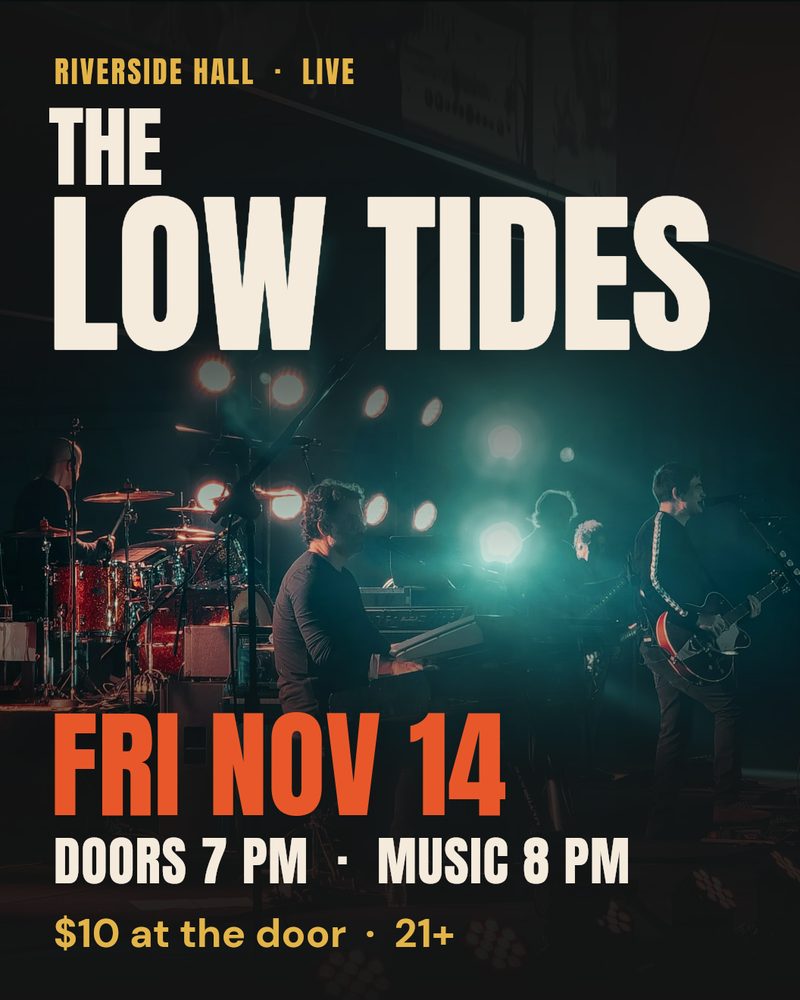
An Instagram poster made in Tealdraft: 'Riverside Hall, Live. The Low Tides. Fri Nov 14. Doors 7 PM, music 8 PM. $10 at the door, 21+' set over a photo of a band on a dark stage. Live text in your brand font Stock photo, credited AI change: bigger price line Undo
Made in Tealdraft from one request. Every layer is still yours to change.

The editor

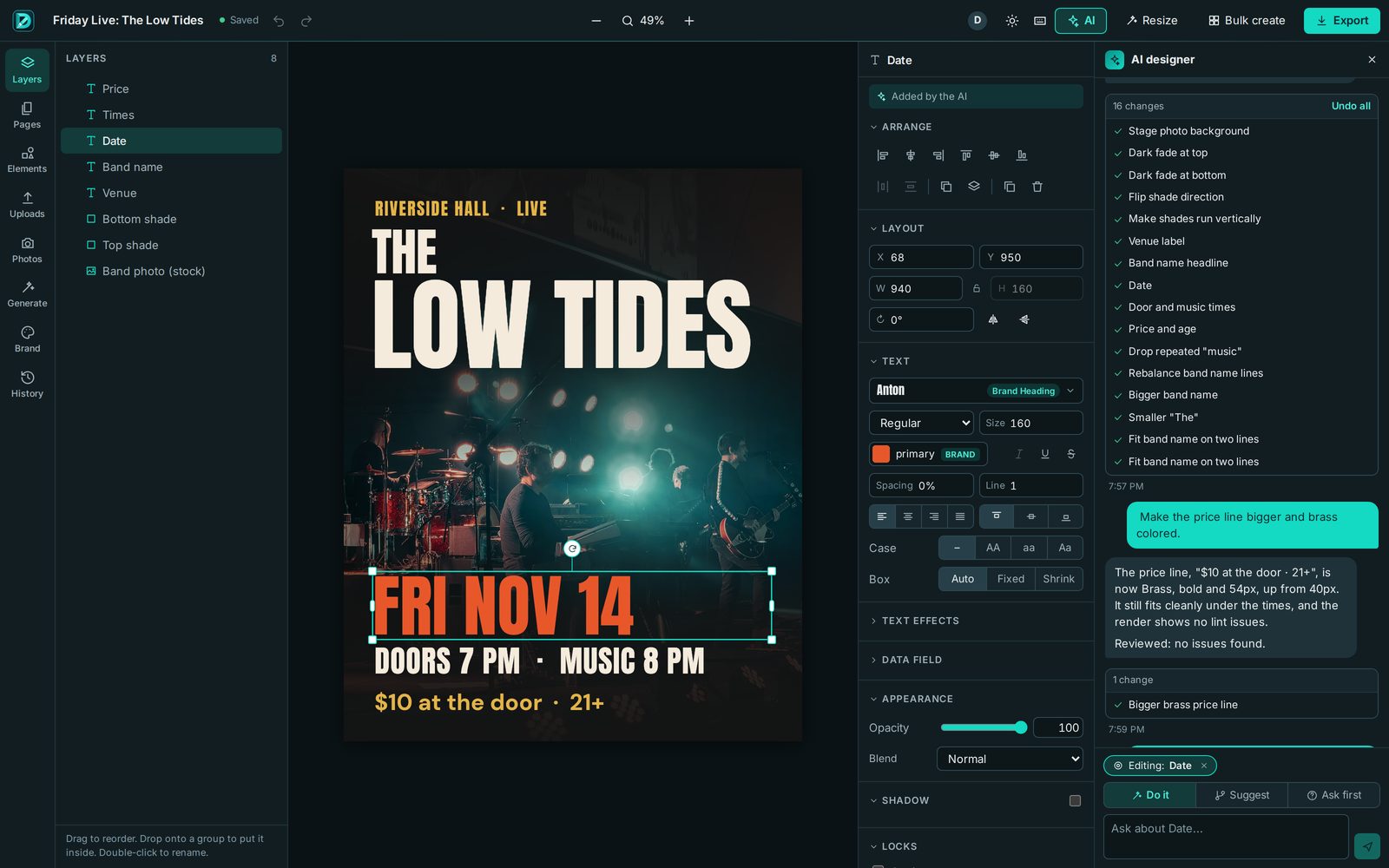
The Tealdraft editor. On the left, the layers panel lists Price, Times, Date, Band name, Venue, two shades and the band photo. In the middle, the poster with the date selected. Next to it, the text settings show the Anton brand heading font at size 160 in the brand's primary color, marked 'Added by the AI'. On the right, the AI designer panel lists its 16 changes, then a request to make the price line bigger and brass, its reply, and a single change: Bigger brass price line.
A real design in Tealdraft. The AI built the first version from a short request, listing each of its 16 changes. Asked afterwards to make the price line bigger, it made exactly one change.

How the AI works

An AI that designs with you, not instead of you

Most AI design tools hand you a finished picture. Tealdraft's AI works inside the editor, with the same tools you use, so you can follow every step and change any of it.

What it does

  • Lays out your page: grid, type sizes, spacing, what goes first
  • Sets your words in your brand's fonts and colors
  • Finds a photo: yours first, then credited stock
  • Picks an icon from the library, or makes a single element when nothing fits
  • Looks at the result and fixes what's off

What it never does

  • Generate your whole design as one image
  • Put words inside a generated picture
  • Touch layers you've locked
  • Redo the whole design when you asked for one change
1

Side by side, at your pace

The AI has its own cursor on the canvas. You can watch it place layers while you work on another page, and stop it at any moment.

You choose how much it does: Do it makes the change, Suggest shows options side by side for you to accept or dismiss, and Ask first checks with you before anything changes. Select a headline and ask for three versions, and you get three to compare.
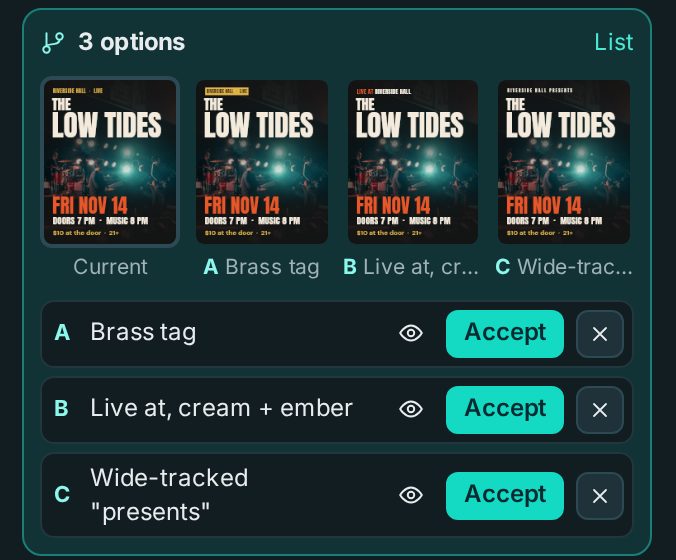
The AI panel showing '3 options' for the venue line: small previews of the current poster and options A, Brass tag, B, Live at in cream and ember, and C, Wide-tracked 'presents', each with Preview, Accept and Dismiss buttons.
2

Real text, real layers, never a flat picture

Every word stays live, editable type in a real font. Fix a typo or change a price in two seconds, no regenerating.

When a design needs something drawn, the AI makes one element at a time (a backdrop, an icon, a texture) and it lands on its own layer. Generated images are checked for words, and any with text in them are thrown out. A generated logo is a symbol only; the name is set in real type.

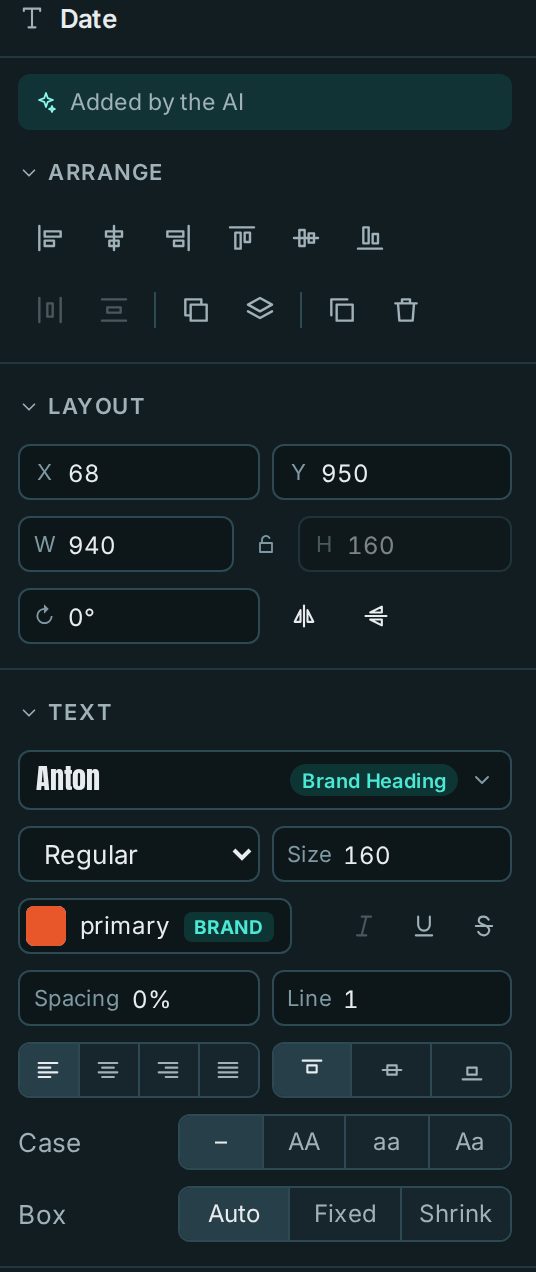
Text settings for the poster's date layer, marked 'Added by the AI': position and size fields, the Anton font labelled Brand Heading, size 160, the brand's primary color, spacing, line height, alignment and case controls.
3

Your look, not the AI's

Designs are composed from your brand kit: your colors, fonts, logo and rules like "date readable from across the room". Colors and fonts stay linked to the kit, so a re-brand is one change.

Tealdraft remembers the layouts it made for you recently and avoids repeating them, so this week's poster doesn't look like last week's. Pictures come from your own photos first, then credited stock photos, and generation only when nothing else fits.

  • 1Your photosThe venue, the team, the food
  • 2Stock photosFrom Unsplash, with the photographer credited
  • 3Generated elementsOne at a time, on their own layer, no text
4

It changes what you asked for, nothing else

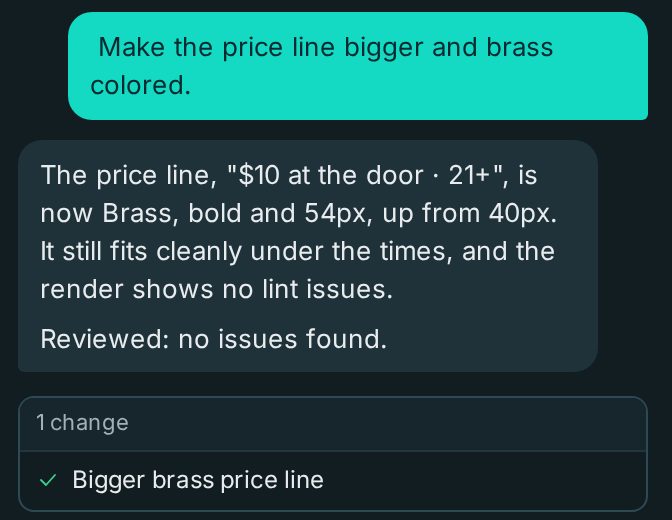
"Make the price bigger" changes the price. Every request has a scope: what you selected, or what you named. If a request would touch far more than that, it stops and asks.

Each AI change is listed and can be undone on its own, or all at once. Lock any layer and the AI won't touch it. Every layer remembers who made it.

A chat request, 'Make the price line bigger and brass colored', the AI's reply explaining the price line is now brass, bold and 54px and still fits, 'Reviewed: no issues found', and a list with exactly one change: Bigger brass price line.
5

It checks its own work

After each step the AI renders the page and looks at it, the way you would. Design checks catch text spilling out of its box, words that are hard to read against the background, and repeated words.

When a round of changes is done, a separate reviewer looks over the result with fresh eyes, and anything it flags gets fixed before you're told it's finished.

  1. ✓Look at the renderThe actual pixels, not a guess
  2. ✓Design checksOverflow, contrast, repeated words
  3. ✓Independent reviewA second pass after each round

Features

A full design editor, with the busywork handled

Everything the AI can do, you can do yourself with the same tools.

A real editor

Text, photos, shapes, vector graphics and groups. Snapping and spacing guides, a layers panel, multiple pages and keyboard shortcuts.

Magic resize

Turn one design into every size you post: square, portrait, story, Facebook event cover, flyer and more. The layout is rebuilt for each shape, not stretched.

Bulk create

Paste a list or upload a spreadsheet of events and get a poster for each one, a month of Friday nights in one go, checked and downloadable as a zip.

Background removal

Cut a person or product out of a photo in one click. The original is kept, so you can restore it any time.

Stock photos

Search Unsplash from inside the editor. Photographers are credited automatically.

Brand kits and your fonts

Colors, fonts, logos, voice and rules for each brand. Pick from 51 fonts or upload your own. The AI follows the kit too.

Work together, live

Several people (and the AI) in the same design at once, each with their own cursor and their own undo.

Print-ready PDF

Flyers and posters at print sizes, with bleed, crop marks and safe-zone guides, at 300 dpi. Warnings for low-resolution photos. PNG and JPG for everything else.

QR codes

Sharp vector QR codes in your brand colors, with the link editable any time. It warns you when a code is too small or too faint to scan.

Icons and illustrations

A library of open-licence icon sets you can recolor to match your brand. The AI looks here before it generates anything.

Your own photos, any phone

Upload straight from an iPhone or Android, and your photos are the first thing the AI reaches for.

On the roadmap

  • Series templates for weekly events
  • Scheduling to Facebook and Instagram
  • Review links and approvals

Works with Tealcut

One account for your designs and your videos

Tealdraft is the sister app to Tealcut, the video editor built on the same ideas. Sign in to both with one account. Shared brand kits, photos and credits across the two apps are coming next.

Questions

Good to know

Is this an AI design generator?

No. There's no button that turns a prompt into a finished picture. Tealdraft is a design editor, and the AI works in it the way a designer would: placing text, photos and shapes as separate layers you can change.

Will my designs look like every other AI design?

That's the problem Tealdraft is built to avoid. The look comes from your brand kit and your photos, not the AI's defaults, and it keeps track of the layouts it made for you recently so it doesn't repeat them.

Can I use it without the AI?

Yes. Every tool is there for you to use by hand. Use the AI for the parts you'd rather not do, or not at all.

What if the AI changes something I didn't want?

Undo that one change and keep the rest. Every AI change is listed separately. Lock the layers you want left alone, or switch to Suggest or Ask first so nothing changes until you say so.

Where do the photos come from?

Your own uploads first. Then stock photos from Unsplash, credited to the photographer. Generated images are a last resort, one element at a time, and never contain text.

Can I print what I make?

Yes. Download a print-ready PDF with bleed and crop marks at 300 dpi for flyers and posters, or full-size PNG and JPG files for anything else. Tealdraft warns you about photos that are too low-resolution to print well.

When can I start?

We're opening early access to a small group first. Join the list below and we'll email you when your spot opens.

Get early access

Tell us where to reach you and what you make. We'll write when your spot opens.

What do you make most? (optional)